Posts

Showing posts with the label 306

FYP: Accessibility, and Justification of Equipment

The next step was hooking up the master arduino to Hazel and have it listening out for the webapp's messages. This wasn't that hard as I'd already done it as part of my prior development in December. Unfortunately I was lacking a WiFly shield I had borrowed from the university at the time, and the university had all of the WiFlys booked out.  However part of the intention of this project was accessibility, the components needed to be cost effective and easily accessible. This cannot be said for the WiFly shield as it costs around $70 . The official Arduino WiFi shield costs around the same . Instead I actively opted to use an ethernet shield for a number of reasons: Price. A new third-party ethernet shield can cost less than £10 on ebay. The one I bought for this project cost £12.49 . I selected that one because it had UK distribution. Standardization. Nearly any third-party ethernet shield can be used with the Arduino's default Ethernet library. Ano...

FYP: Sorting out the Webapp, MQTT

Image
Well this blogging thing hasn't been anywhere near as regular as I hoped it would be. Anyway at this point solid radio communication had been established and it was time to connect it up to the webapp. I decided to use MQTT as a communication protocol between the webapp and the Arduino with the transmitter on it, the master. My VPS, Hazel, has an MQTT broker running on it currently. Hooking up the webapp to publish was pretty easy using the mqttws library, a library for sending and receiving MQTT messages over web sockets. I set up the webapp  so that it published the contents of the form with an identifier and the value for the respective form element. At this point I wanted as much logic to be handled by the webapp as possible. I wanted the transmitter to be completely dumb. This meant that if I wanted to change how the data string worked I could do it on the webapp and not have to touch the master Arduino. So the webapp was pretty functional. It sent values through an ...

FYP: Arduino data transfer over 433MHz RF

Image
So Tuesday went... interestingly. Getting the transmitter transmitting data other than the binary ones and zeros went kinda well. It wasn't quite as hard as I expected, but still took a little while to get sorted. The goal was to set up the transmitter sending a numerical ID and a value between 0 and 170. The 0-170 value was so that the receiver could forward this onto the servo, which would then the volume knob. This was generated by a potentiometer reading being mapped from 0-1023 to 0-170. Then this number was converted into a string, and prefixed with a number of '0's to ensure the string length was 3 characters. So essentially '139' would remain unchanged, '72' would be prefixed with a '0' to make the string '072', and '8' would be prefixed with two '0's to make '008'. This three character string would be then prefixed by the one character ID. Broadcasting something like 1139, 1072 or 1008. Getting this transm...

FYP: Shonky Wifi & Radio Frequency

Image
So the initial goal today was to essentially hook up the already completed Arduino & MQTT volume control setup to the Acorn webapp. So instead of manually inputting a number into an MQTT client, I was intending on adding a volume slider on Acorn. This would mean that I could simply slide the slider to allow control over the servo, and thus volume. The completed portion (made around December 2013) can be seen here: However that didn't end up happening. The hurdle was that the WiFi shield I'd hastily grabbed from the university appeared to be a dud. I could have still gotten on with the webapp side, but I figured that I'd rather spend another day doing that when I could test it properly with the servo stuff. Instead I decided to get on with the communication stuff. I needed a way for all the Arduinos to talk to each other. A while ago I purchased some 433MHz radio frequency transmitters and receivers . I chose the 433 ones because of their low cost and my remote con...

FYP: Lego - the best form of rapid prototyping

Image
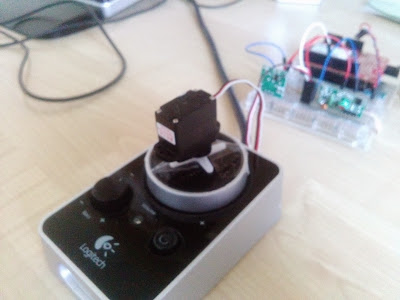
So Progressing on and actually starting the build of this hunk of technology I decided to tackle the servo first, as I had all the equipment all ready. So simple enough I hooked up the servo to the Arduino and managed to get it working fine with a couple of test values. Using some of the stuff I learned from Chris' and the IBM workshops I wrote a little sketch that connects to the web through my WiFi and subscribes to a topic on Chris' remote MQTT broker. It takes the values coming in from the topic and if they're integers and between the values of 0 and 170 it sends them to the server. I'm using a max value of 170 because my little ol' servo's a bit busted and struggles with values above 170. Using mqtt.io  I sent some test values over and it after a little fiddling it worked. The next step was to hook up the servo to a set of speakers. I attached a spoked attachment onto the servo, and then taped the attachment onto the volume control for my parents' PC....

FYP: Usability & Blackboxing

The test of consumer technologies is ‘plug-and-ability’. I need to be able to do things (such as like 3D printing) as easily as I can go on to Drive and write this out now. Basically new technologies need to ‘just work’, without all the hassle of complicated set ups. One example that springs to mind would be the lightswitch. Until recently, the core concept of how a lightswitch works hadn’t changed since the 1800s. The LIFX bulb is a relatively new product that allows the user to control the lights with their smartphone using a wifi-capable lightbulb. My dissertation will aim to discuss how emerging and existing technologies can and will optimize the way we interact with our environment, focusing primarily on the home. I feel pseudo-blackboxing is an essential in good UX design - the average consumer really doesn’t need to know the backend goings on of a product, only inputs and outputs. However still retaining the option to remove the blackbox for development. For a product...

FYP: A system that monitors electricity usage of individual appliances around the home

Image
Okay, so this popped up on kickstarter recently: http://www.kickstarter.com/projects/energyaware/neurio-home-intelligence This seems like a pretty useful tool to monitor everything going on around the house. Using it's API, it could in theory be integrated into my system to further the automation & self-learning aspect of the system. 

FYP: I love Make Magazine

Image
I follow Make: Magazine, and they released a video yesterday demonstrating how to create an RGB LED controller using an Arduino & Android device. This is pretty useful to me as I can use half of this tutorial to control the RGB LED strip I have. Although at this point I feel like most of the research and development had already been done, and kinda feel like there's not really much for me to do besides. Like I explained in my previous post about LightwaveRF  I feel like that the majority of what I aim to do has already been implemented, albeit in a proprietary, blackbox way. I kind of need to change my idea, or at least implement it in a way that hasn't been implemented before. 

FYP: LightwaveRF, a similar modular smarthouse

Image
After explaining my project to my cousin, she brought to my attention an article in the Metro about this. While the article was pretty broad and didn't really go into specifics, it referenced something called LightwaveRF . After looking on their website I found it's uncannily similar to what I intend to do. Looking specifically at their 'day in the life' page  they've done almost exactly what I intend to, and implemented it extremely well. Upon further reading it seems that they've implemented the technology extremely well, however their general business model seems a bit far from what I see mine to be. All their components seem proprietary, meaning that you must buy it from them - which is not cheap. While you can buy individual components, it seems that you need to get the system installed by an approved installer. I tried calling them to ask some questions, but their offices aren't open on Saturdays; I'll try again on Tuesday. My project aims...

FYP: The Birth of Acorn, the webapp

Image
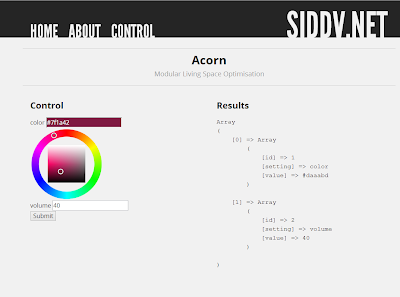
I've developed a little webapp that demonstrates the way this controller works. Screen one shows an overview of the web version of the controller. On the left is the form that allows the user to modify the existing values. All this is generated on the fly based on existing data in the database. The database table has an 'attribute' value that determines if the form produces a slider, button, colour picker and others for that value. On the right is a JSON array produced from the database. The script that generates these results pulls data from the server every half second. Using the colour picker I've changed the colour value, but NOT submitted the form. Screen two shows what happens when I've submitted the form. Using AJAX the data is pushed to the server, and the user gets visual feedback of this by the left pane whiting out and a loading circle appearing. Screen three shows what happens after the data's been pushed. The right pane has ...

FYP: Working out Modules

Here's a little list of how I expect some of the modules to work: Master controller: Phone/Webapp -> PHP POST -> SQLdb entry Master receiver: Network capable Arduino/Pi sends several requests to the web DB per second.   Lights RGB bulb/strip along ceiling/wall join 4 pin input -> Arduino -> Wireless transimtter  (RasPI?/Wifi Sheild) -> Phone Sound Servo hooked up to volume knob 4 pin input -> Arduino -> Wireless transimtter  (RasPI?/Wifi Sheild) -> Phone Food Fridge Weight sensors under products to detect quantity and presence. Notification  when supplies are runing low Cooking Grill turns on at schedueled/dictated times. Leave food in grill in the morning Movement motion dectors door open /closed  sensors Security IP cameras - this will also help with keeping an eye on plants/oven/other time sensitive applications.

FYP: Playing with Arduino

Image
So I've been having a play with the technology I need to make this work. Using an Arduino, servo & potentiometer I devised a digital controller for my amplifier. Using the input from the potentiometer mapped to the output of the servo I can control my amp volume. The theory involved in this is a proof of concept - if I can prove I can control volume this way, then it's a stepping stone towards controlling it remotely.

FYP: The idea

Image
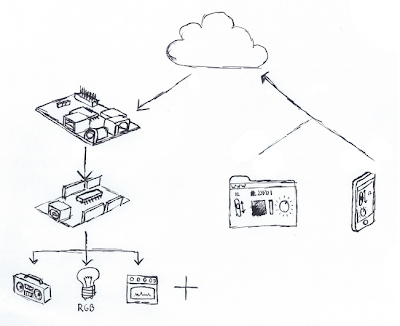
So, this is the first post in my blog for a very long time - mostly because I just finished placement, and now have the motivation and developed the work ethic to do this. It's a bit of a canvas for my final year project idea that I've been researching and developing slowly over the past few months. I now have a relatively solid idea. So the gist of it is effectively a smarthouse with easy-to-develop, upgradable modules. The user will begin by interacting with a webapp, or an app on a smartphone. The user will be prompted my a control panel of sorts. Using the intuitive knobs and sliders they can change values for volume, light levels and even turn devices on and off. The way this works is by taking the values, once submitted, and pushing them to a web-based database. The central controller for the smarthouse (powered by a Raspberry Pi) has a script running that pulls data from the database every half second. It then pushes these values via serial to an Arduino. The Arduino...